Fall Time: A Bold Display Font That Demands Attention
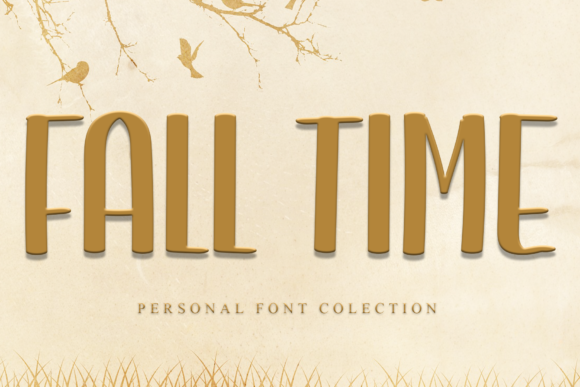
When you are designing a poster, a social media graphic, or a brand identity, the difference between a forgettable design and one that stops the scroll often comes down to typography. Enter Fall Time, a daring and thick lettered display font that brings immediate visual weight and character to any project. It is not just another sans-serif; it is a statement piece designed for impact.
However, using a font with such strong personality requires more than just dragging and dropping it onto a canvas. Many designers, particularly those new to the craft, make critical errors when integrating heavy display fonts like Fall Time into their workflows. These mistakes can undermine the very boldness the font was created to provide. Let’s explore how to use this typeface effectively, avoid common pitfalls, and ensure your creative ideas stand out in the best possible way.
Understanding the Power of Thick Lettering
Fall Time is characterized by its substantial stroke width and confident curves. This "thick lettered" aesthetic makes it ideal for headlines, titles, and short phrases where legibility at large sizes is key. Unlike delicate serif fonts that require reading space and fine detail recognition, Fall Time commands attention through mass and shape.
But why are people interested in it? In an era of digital clutter, users respond to clarity and boldness. A well-chosen display font like Fall Time cuts through the noise. It conveys strength, reliability, and modernity. Whether you are a small business owner launching a product or a blogger creating a featured image, this font offers a quick path to professional-looking hierarchy without needing complex layout skills.
Common Mistakes When Using Display Fonts
Even experienced creators can stumble when working with high-impact typefaces. The allure of a striking font can sometimes lead to overuse or improper application. Here are some frequent misunderstandings that can affect the quality and efficiency of your designs.
- Overcrowding the Canvas: One of the biggest errors is trying to fit too much text around a bold headline. Because Fall Time is visually heavy, it competes for attention. If you surround it with dense paragraphs or multiple competing elements, the design becomes chaotic rather than impactful.
- Poor Contrast Management: A thick font needs room to breathe. Placing Fall Time on a busy background or against low-contrast colors can make the letters merge into the backdrop. This reduces readability and diminishes the "daring" quality of the typeface.
- Misusing Kerning and Tracking: Display fonts are engineered with specific spacing (kerning) built-in. Manually adjusting the tracking (overall letter spacing) too widely can break the visual integrity of the word marks. Conversely, cramping them together can cause the thick strokes to collide, creating muddy shapes that are hard to read.
- Using It for Body Text: While it might seem tempting to use Fall Time for long-form content because it is easy to read at large sizes, it is terrible for body copy. The thick strokes will cause eye fatigue quickly. Always reserve display fonts for headings and short accents.
The Impact on Usability and Satisfaction
These mistakes do more than just look bad; they affect the effectiveness of your communication. If a potential customer cannot immediately grasp your message because the typography is cluttered or illegible, the conversion rate drops. For educators and freelancers, clear communication is paramount. A poorly applied font can signal a lack of attention to detail, potentially damaging credibility.
Furthermore, inefficient use of fonts leads to wasted time. Trying to fix spacing issues or contrast problems after the fact is far more time-consuming than getting the hierarchy right from the start. By understanding the limitations and strengths of Fall Time upfront, you save hours of revision and produce higher-quality assets.
Practical Advice for Better Typography
To get the most out of Fall Time, treat it as a partner in your design process, not just a decoration. Here are actionable steps to ensure your projects shine.
- Pair with Simplicity: Pair Fall Time with a clean, neutral sans-serif or a simple serif for supporting text. The contrast between the bold display font and the understated body text creates a sophisticated balance. Let Fall Time be the star; let the other font do the heavy lifting for information delivery.
- Embrace Negative Space: Give your headlines room to expand. Increase the padding around your text blocks. This negative space frames the thick letters and enhances their perceived value. Think of it as giving the font a stage to perform on.
- Check Color Contrast Rigorously: Before finalizing a design, check your color choices. If you are using Fall Time in white, ensure the background is dark enough to provide sufficient luminance contrast. Tools like accessibility checkers can help verify that your text meets WCAG standards, ensuring your design is inclusive and readable for all audiences.
- Vary Weights Strategically: If Fall Time offers multiple weights (like Regular, Bold, or Black), use them to create hierarchy within your headline itself. You might use the boldest weight for the main keyword and a lighter weight for secondary words. This adds depth without adding clutter.
Evaluating and Choosing the Right License
Before you download or purchase Fall Time, it is crucial to evaluate the licensing terms. Fonts are intellectual property, and using them incorrectly can lead to legal complications, especially for commercial projects. Ensure that the license covers your intended use—whether it is for web, print, merchandise, or video.
For entrepreneurs and marketers, understanding these terms protects your brand. A cheap or free license might restrict you from using the font on physical products, which could halt a marketing campaign unexpectedly. Always read the fine print. Look for clarity on redistribution, modification rights, and attribution requirements.
Testing Before Committing
Do not commit to a full purchase or a final design until you have tested the font in context. Create mockups of your actual project materials—a business card, a website header, or an Instagram post. See how Fall Time behaves at different sizes. Does it lose detail when scaled down? Does it clash with your existing brand colors? Real-world testing reveals nuances that previews often hide.
Conclusion: Making Fall Time Work for You
Fall Time is a powerful tool in the designer’s arsenal. Its daring, thick lettering can elevate mundane layouts into memorable experiences. However, power requires control. By avoiding common mistakes like overcrowding, poor contrast, and misuse for body text, you can harness the full potential of this typeface.
Remember, good typography is about balance. Let Fall Time provide the energy and the hook, while your layout and supporting elements provide the structure and clarity. With careful planning and respect for the font’s characteristics, you will create designs that not only look great but also communicate effectively. Start experimenting today, but always prioritize clarity and intentionality in every letter you place.