Goldisyle
Choosing the right typography is often the difference between a design that feels polished and one that looks like a draft. For designers, marketers, and content creators, the visual voice of a brand or project hinges on subtle details. One typeface that has been gaining traction for its unique character is Goldisyle. It is described as a brushed, stylish display font featuring relaxed and natural stroke movements. But beyond the marketing buzzwords, what does this actually mean for your workflow? More importantly, are there pitfalls you need to watch out for when integrating this specific font into your projects?
Many users rush to download fonts based solely on their aesthetic appeal, only to find later that the technical implementation causes headaches. Goldisyle offers a distinct advantage with its PUA (Private Use Area) encoding, but understanding how this works is critical to avoiding compatibility issues. This article breaks down the practical realities of using Goldisyle, highlighting common misunderstandings and providing actionable advice to ensure your designs remain professional and functional.
Understanding the Aesthetic: Brushed and Relaxed
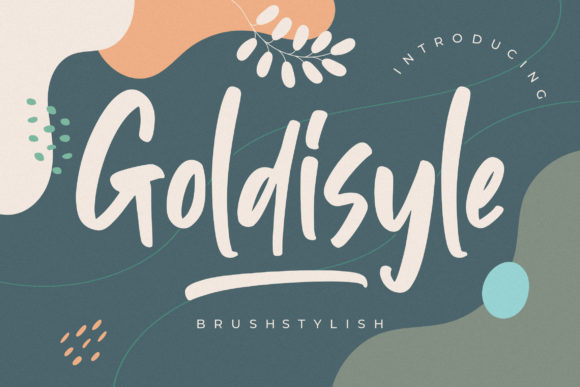
The core appeal of Goldisyle lies in its "brushed" quality. Unlike rigid geometric sans-serifs or traditional serif fonts, Goldisyle mimics the organic flow of a brush moving across paper. The strokes are relaxed, suggesting a hand-crafted feel without the messiness of actual calligraphy. This makes it an excellent choice for brands aiming to convey approachability, creativity, and modern elegance.
However, a common mistake beginners make is assuming that "relaxed" means "casual" in a way that undermines professionalism. While Goldisyle is stylish, it is still a display font. Display fonts are designed to be read at larger sizes—headlines, titles, logos, and banners—not body text. Using Goldisyle for long paragraphs of copy is a frequent error that leads to reader fatigue. The intricate brush strokes can become muddy and hard to decipher when scaled down to small point sizes.
Practical Tip: Reserve Goldisyle for headlines, pull quotes, and logo treatments. Pair it with a clean, neutral sans-serif or serif for body text to create a balanced hierarchy. This contrast ensures that while the title grabs attention with its artistic flair, the information remains accessible and easy to read.
The Technical Advantage: PUA Encoding Explained
One of the most significant features of Goldisyle is its use of PUA encoding. For those unfamiliar with typography terminology, the Private Use Area (PUA) is a section of the Unicode standard reserved for private use by applications and operating systems. In the context of fonts, this allows designers to include a vast array of glyphs, swashes, ligatures, and alternate characters that do not have standard keyboard shortcuts.
This means you can access all of the glyphs and swashes with ease, adding a layer of customization that standard fonts lack. You can swap out a standard 'a' for a more decorative version, or add ornamental flourishes to headings without needing complex CSS tricks or external icon libraries. This flexibility is a major selling point for creative professionals who want to inject personality into their work.
Common Misunderstandings About PUA Fonts
Despite the benefits, PUA-encoded fonts come with specific challenges that can disrupt your workflow if you are not prepared. The primary issue is accessibility and search engine optimization (SEO). Because PUA characters are not mapped to standard Unicode code points, screen readers may struggle to interpret them correctly. If you use a PUA glyph for a letter in your headline, a visually impaired user might hear gibberish instead of the intended word.
- Accessibility Risks: Always provide alternative text (alt text) for any images containing PUA text. Better yet, avoid using PUA glyphs for critical navigation elements or legal disclaimers where clarity is paramount.
- Search Engine Visibility: Search engines cannot index PUA characters effectively. If your H1 tag uses a PUA glyph for a key keyword, Google might not associate your page with that term. Stick to standard characters for your primary SEO keywords, and use the stylized PUA versions for secondary decorative elements.
- Software Compatibility: Not all design software handles PUA fonts consistently. Some older versions of Adobe Illustrator or free web editors might display boxes or missing glyphs instead of the intended swash. Always test your files in the specific environments where they will be used.
Evaluating Goldisyle for Your Specific Needs
Before adding Goldisyle confidently to your projects, it is essential to evaluate whether it aligns with your project's goals. The prompt suggests you won't be disappointed, but satisfaction depends on proper application. Consider the following checklist before making a final decision:
- Brand Voice Alignment: Does your brand value whimsy and artistry over strict minimalism? Goldisyle’s natural stroke movements fit well with lifestyle, beauty, artisanal food, and creative agency brands. It may clash with corporate finance or tech startups that prioritize precision and neutrality.
- Licensing Clarity: Ensure you have the correct license for your intended use. Display fonts often have different licensing tiers for personal use, commercial print, and web embedding. Check the terms to see if you need a separate web font license if you plan to host the file on your server.
- Pairing Potential: Visualize how Goldisyle interacts with other fonts. Its heavy, expressive nature requires a strong counterpart. Avoid pairing it with other decorative fonts, which can create visual chaos. Instead, opt for simple, high-contrast pairings.
Best Practices for Implementation
To get the most out of Goldisyle, adopt a disciplined approach to its usage. Here are some strategies to enhance your results:
Use Swashes Sparingly: The allure of PUA encoding is the abundance of swashes. However, overusing them can make your design look cluttered and unprofessional. Use swashes to highlight single words or short phrases, not entire sentences. Let the typography breathe.
Check Contrast and Color: Brushed fonts rely on texture and variation in stroke width. Low-contrast color combinations (e.g., light gray text on a white background) can obscure these details. Ensure sufficient contrast to maintain legibility and preserve the font’s stylistic integrity.
Test Across Devices: Web fonts can render differently depending on the browser and operating system. Upload your Goldisyle file to a staging environment and view it on mobile, tablet, and desktop screens. Verify that the brush strokes do not blur excessively on high-DPI displays and that the PUA glyphs load correctly.
Conclusion
Goldisyle is a versatile and stylish tool for any designer’s toolkit. Its brushed aesthetic and PUA encoding offer significant creative freedom, allowing for unique and engaging visual communications. However, realizing its full potential requires a nuanced understanding of its limitations. By avoiding common mistakes such as misusing it for body text, neglecting accessibility concerns, and ignoring software compatibility, you can integrate Goldisyle seamlessly into your projects.
Add it confidently to your projects, but do so with intention. Evaluate your brand needs, respect licensing agreements, and prioritize readability alongside style. When used correctly, Goldisyle can elevate your designs, creating a memorable impression that resonates with your audience. Remember, good design is not just about looking good; it is about communicating effectively. With Goldisyle, you have a powerful brushstroke to help tell your story.